
Welcome to this in-depth technical manual for SkyCrown Casino Online, a platform gaining traction in the digital gambling sphere. This whitepaper is designed for both new and experienced users seeking to master every facet of the skycrown online casino ecosystem, from the sleek skycrown app to complex bonus mathematics and robust security frameworks. We will dissect registration protocols, mobile optimization, financial operations, and troubleshooting, providing actionable insights and detailed scenarios.
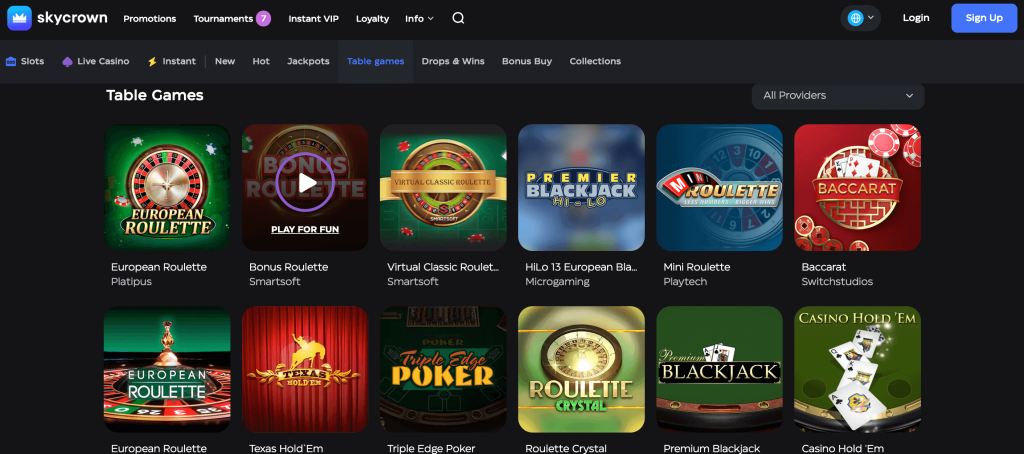
Before You Start: Prerequisite Checklist
Ensure optimal operation by verifying these points before engaging with the skycrown casino online platform:
- Jurisdiction Compliance: Confirm that online gambling is legal in your country of residence and that SkyCrown accepts players from your region.
- Device Compatibility: For the skycrown app, check that your iOS or Android device meets the minimum OS requirements and has sufficient storage.
- Payment Method Readiness: Have at least one valid payment method (e.g., credit card, e-wallet, crypto) ready for verification and transactions.
- Documentation: Prepare scanned copies or clear photos of your government-issued ID and a recent utility bill for KYC (Know Your Customer) processes.
- Network Security: Use a secure, private Wi-Fi connection or a trusted VPN to protect data during registration and banking.
Registration: A Step-by-Step Protocol
Creating an account at SkyCrown is streamlined but requires precision to avoid verification delays.
- Navigate to the official SkyCrown website via a secure browser.
- Click the ‘Sign Up’ or ‘Register’ button, typically prominent on the homepage.
- Fill the form with accurate personal details (full name, date of birth, email, phone number). Critical: This data must match your official documents.
- Set a strong, unique password combining letters, numbers, and symbols.
- Agree to the Terms and Conditions after reviewing them, and confirm you are of legal age.
- Verify your email address by clicking the link sent to your inbox. Some jurisdictions may require SMS verification.
- Log in and proceed to the cashier to make your first deposit, which often triggers the welcome bonus.
Deep Dive: The SkyCrown App Architecture
The skycrown app is a native application for iOS and Android, offering a optimized experience versus the mobile browser. Installation involves downloading the APK file directly from the website for Android (due to Google Play restrictions) or using a progressive web app (PWA) for iOS. Key technical features include push notifications for bonuses, biometric login support (Touch ID, Face ID), and offline mode for game rules review. The app’s cache management is crucial; regularly clear cached data in device settings if games load slowly to refresh asset libraries.
Specifications Table: Core Platform Metrics
| Category | Specification |
|---|---|
| Licensing Authority | Curacao eGaming (Master License No. 365/JAZ) |
| Game Providers | NetEnt, Pragmatic Play, Evolution, Play’n GO, +40 others |
| Welcome Bonus Structure | Up to $2,000 + 200 Free Spins over first 5 deposits |
| Wagering Requirement (Standard) | 40x (Bonus + Deposit amount) |
| Withdrawal Timeframe | 0-24 hours for e-wallets, 1-5 banking days for cards |
| Minimum Deposit | $10 (varies by method) |
| Maximum Withdrawal | $4,000 per week (unverified), $20,000 per week (verified) |
| SSL Encryption | 256-bit TLS 1.3 |
| App Size (Android) | ~52 MB (APK file) |
Bonus Strategy & Mathematical Modeling
Bonuses at skycrown online casino are lucrative but come with complex wagering requirements. Understanding the math is key to profitability. Let’s analyze a common scenario: You claim a 100% deposit match up to $500 with a 40x wagering requirement on the sum of deposit and bonus.
- Calculation: Deposit $500 → Receive $500 bonus. Total bonus credit = $1,000. Wagering requirement = 40 x $1,000 = $40,000.
- Game Contribution: Slots typically contribute 100%, table games 10%, live games 5%. To clear efficiently, play only 100% contribution games.
- Expected Cost: Assuming a game RTP of 96%, you can expect to lose 4% of wagered amount. Theoretical loss during wagering = $40,000 * 0.04 = $1,600. Since you have $1,000 in credit, this bonus has a negative expected value (-$600) if wagered completely. Strategy: Target bonuses with lower wagering (e.g., 30x) or use free spins with lower playthrough.
Banking Methods: Protocols and Limits
SkyCrown supports a wide array of payment systems. Deposits are instant, but withdrawals undergo security checks. For crypto users, Bitcoin and Ethereum transactions often have higher limits and faster processing. Always note the minimum withdrawal of $20 and the weekly cap. Internal audits may flag consecutive withdrawals under $100 for enhanced review to prevent money laundering. It’s advisable to use the same method for deposit and withdrawal to streamline verification.
Security Protocols and Fairness Audit
The platform employs 256-bit TLS encryption for all data transfers. The Curacao license mandates regular financial audits. Game fairness is ensured through certified RNGs (Random Number Generators) from providers, with public audit reports available for games like NetEnt slots. Users should enable two-factor authentication (2FA) if offered and monitor login activity via account settings. The skycrown app uses sandboxing to isolate financial data from other device applications.
Troubleshooting Scenarios
Scenario 1: App Crashing on Launch. Solution: Clear app data (Settings > Apps > SkyCrown > Storage > Clear Data) and re-login. Ensure your device OS is updated. For iOS, reinstall the PWA.
Scenario 2: Withdrawal Pending for 72+ Hours. Solution: This typically triggers a manual KYC check. Contact support via live chat with your document copies ready. Ensure you have met all wagering requirements and that your account is fully verified.
Scenario 3: Bonus Not Activated After Deposit. Solution: Check if you entered a bonus code during deposit. If not, you may need to opt-in from the ‘Bonuses’ section first. Contact support with your deposit transaction ID.
Extended FAQ: Technical and Operational Queries
Q1: Is the skycrown app available on Google Play Store?
A: No, due to Google’s policies on real-money gambling apps. Android users must download the APK directly from the SkyCrown website, enabling ‘Install from unknown sources’ in device security settings temporarily.
Q2: How do I calculate the real cost of a free spins bonus?
A: Example: 50 free spins on a slot with $0.2 bet per spin. Total bet value = 50 * $0.2 = $10. If winnings from free spins are $15 with a 40x wagering requirement, you must wager $15 * 40 = $600. Assuming 96% RTP, expected loss = $600 * 0.04 = $24. Net value = $15 – $24 = -$9. Thus, the bonus has a cost.
Q3: What happens if I forget my skycrown app password?
A: Use the ‘Forgot Password’ link on the app login screen. You will receive an email with a reset link. If you no longer have access to that email, contact support with account details for identity verification.
Q4: Are there geographic restrictions for certain games?
A: Yes, due to licensing, some game providers (e.g., NetEnt) may be unavailable in countries like the UK or USA. The game lobby will dynamically adjust based on your IP address location.
Q5: What is the protocol for disputing a game outcome?
A: First, check the game history in your account. If an error is suspected, contact support immediately with the game ID, timestamp, and a screenshot. The casino will review server logs and RNG data for that session.
Q6: How does the skycrown online casino handle dormant accounts?
A: Accounts inactive for 12 months may be subject to an administrative fee (e.g., $5 per month) after prior notification, as per Terms. Withdraw any balance before prolonged inactivity.
Q7: Can I use multiple bonuses concurrently?
A: No, SkyCrown typically allows only one active bonus at a time. Attempting to activate a new bonus before clearing the existing one will void the previous offer.
Q8: What are the system requirements for the desktop platform?
A: A modern browser (Chrome 90+, Firefox 88+) with JavaScript enabled, and a stable internet connection of at least 5 Mbps for live dealer games. Adobe Flash is not required.
Q9: How are winnings from free spins treated for tax purposes?
A: Tax liability depends on your jurisdiction. SkyCrown does not withhold taxes; it is the player’s responsibility to declare winnings according to local laws. Keep records of all transactions.
Q10: What is the procedure for self-exclusion or setting limits?
A> Navigate to ‘Responsible Gaming’ in account settings. You can set daily, weekly, or monthly deposit limits, session time alerts, or request a cool-off period (e.g., 30 days). For permanent self-exclusion, contact support.
Conclusion
Mastering the skycrown casino online environment requires a technical understanding of its app architecture, bonus economics, and security layers. This guide has provided a comprehensive framework from registration to advanced troubleshooting. Always prioritize secure practices, read the Terms and Conditions thoroughly, and use the mathematical models to assess bonus viability. SkyCrown offers a robust platform, but informed usage is key to a sustainable and enjoyable experience. For the latest updates, refer directly to the official website.